
1. 防抖
// 防抖:可以和你的电脑设定了10分钟睡眠时间的场景结合起来理解
// 如果你一直在用电脑,那么电脑就不会睡眠(频繁的把前一个定时器关掉,开启新的定时器)
// 当你最后一次没操作电脑10分钟之后,电脑陷入睡眠
const debounce = function (func, delay) {
  let timer = null

  return function (...args) {
    clearTimeout(timer)

    timer = setTimeout(() => {
      func.apply(this, args)
    }, delay)
  }
}

// 测试
// html部分
<input type="text" id="input"/>
// js部分
const showName = debounce(function (name) {
  console.log($input.value, this, name)
}, 500)

$input.addEventListener('input', (e) => {
  // 500ms内停止输入才会输出
  showName.call({ name: '前端胖头鱼' }, '前端胖头鱼')
})
2. 节流
节流:任凭你怎么触发,其在指定的时间间隔内只会触发一次
基于时间戳(方式1)
const throttle = function (func, delay) {
  let startTime = Date.now()

  return function (...args) {
    let lastTime = Date.now()

    if (lastTime - startTime > delay) {
      func.apply(this, args)
      startTime = Date.now()
    }
  }
}

// 测试
let t1 = Date.now()

const showName = throttle(function (name) {
  const t2 = Date.now()
  console.log(this, name, t2 - t1)
  t1 = Date.now()
}, 1000)
// 虽然设置了每隔10毫秒就会执行一次showName函数, 但是实际还是会每隔1秒才输出
setInterval(() => {
  showName.call({ name: '前端胖头鱼' }, '前端胖头鱼')
}, 10)

// { name: '前端胖头鱼' } '前端胖头鱼' 1013
// { name: '前端胖头鱼' } '前端胖头鱼' 1001
// { name: '前端胖头鱼' } '前端胖头鱼' 1006
// { name: '前端胖头鱼' } '前端胖头鱼' 1006
// { name: '前端胖头鱼' } '前端胖头鱼' 1005
基于setTimeout(方式2)
const throttle2 = function (func, delay) {
  let timer = null

  return function (...args) {
    if (!timer) {
      timer = setTimeout(() => {
        func.apply(this, args)
        timer = null
      }, delay)
    }
  }
}
// 测试
let t1 = Date.now()

const showName = throttle2(function (name) {
  const t2 = Date.now()
  console.log(this, name, t2 - t1)
  t1 = Date.now()
}, 1000)

setInterval(() => {
  showName.call({ name: '前端胖头鱼' }, '前端胖头鱼')
}, 10)

// { name: '前端胖头鱼' } '前端胖头鱼' 1014
// { name: '前端胖头鱼' } '前端胖头鱼' 1001
// { name: '前端胖头鱼' } '前端胖头鱼' 1007
// { name: '前端胖头鱼' } '前端胖头鱼' 1011
// { name: '前端胖头鱼' } '前端胖头鱼' 1009
// { name: '前端胖头鱼' } '前端胖头鱼' 1008
3. 函数柯里化
const curry = (func, ...args) => {
  // 获取函数的参数个数
  const fnLen = func.length

  return function (...innerArgs) {
    innerArgs = args.concat(innerArgs)
    // 参数未搜集足的话,继续递归搜集
    if (innerArgs.length < fnLen) {
      return curry.call(this, func, ...innerArgs)
    } else {
      // 否则拿着搜集的参数调用func
      func.apply(this, innerArgs)
    }
  }
}
// 测试
const add = curry((num1, num2, num3) => {
  console.log(num1, num2, num3, num1 + num2 + num3)
})

add(1)(2)(3) // 1 2 3 6
add(1, 2)(3) // 1 2 3 6
add(1, 2, 3) // 1 2 3 6
add(1)(2, 3) // 1 2 3 6
4. bind
bind()方法创建一个新的函数,在bind()被调用时,这个新函数的this被指定为bind()的第一个参数,而其余参数将作为新函数的参数,供调用时使用。MDN
姐妹篇 call实现
姐妹篇 apply实现
Function.prototype.bind2 = function (context, ...args) {
  if (typeof this !== 'function') {
    throw new TypeError('Bind must be called on a function')
  }

  const executeBound = function(sourceFunc, boundFunc, context, callingContext, args) {
    if (!(callingContext instanceof boundFunc)) {
      // 如果调用方式不是new func的形式就直接调用sourceFunc,并且给到对应的参数即可
      return sourceFunc.apply(context, args)
    } else {
      // 类似于执行new的几个过程
      const self = Object.create(sourceFunc.prototype) // 处理new调用的形式
      const result = sourceFunc.apply(self, args)
      // 判断函数执行后的返回结果 非对象函数,则返回self
      if (result && typeof result === 'object' || typeof result === 'function') {
        return result
      } else {
        return self
      }
    }
  }
  const func = this

  const bound = function (...innerArgs) {
    return executeBound(func, bound, context, this, args.concat(innerArgs))
  }

  return bound
}

// 测试
// 1. 普通调用
const showName = function (sex, age) {
  console.log(this, sex, age)
}

showName.bind2({ name: '前端胖头鱼' }, 'boy')(100) // { name: '前端胖头鱼' } 'boy' 100

// 2. new 调用
const Person = function (name) {
  this.name = name
}

Person.prototype.showName = function (age) {
  console.log(this, this.name, age)
}

const bindPerson = Person.bind(null, 'boy')
const p1 = new bindPerson('前端胖头鱼')

p1.showName(100) // Person { name: 'boy' } 'boy' 100
5. 实现一个简易版模板引擎
jQuery时代,模板引擎用的还是比较多的,可以理解为它是这样一个函数,通过模板 + 数据经过一段黑盒操作最后得到需要展示的页面
const render = (template, data) => {
  // \s*?是为了兼容{{name}} {{ name }}这种写法
  return template.replace(/{{\s*?(\w+)\s*?}}/g, (match, key) => {
    // 匹配中了则读取替换,否则替换为空字符串
    return key && data.hasOwnProperty(key) ? data[ key ] : ''
  })
}
const data = {
  name: '前端胖头鱼',
  age: 100
}
const template = `
  我是: {{ name }}
  年龄是: {{age}}
`
console.log(render(template, data))
/*
我是: 前端胖头鱼
年龄是: 100
*/
6. 类数组转化为数组的4种方式
// 类数组转化为数组
const arrayLikeObj = {
  0: '前端胖头鱼',
  1: 100,
  length: 2
}

// 1. [].slice
console.log([].slice.call(arrayLikeObj))
// 2. Array.from
console.log(Array.from(arrayLikeObj))
// 3. Array.apply
console.log(Array.apply(null, arrayLikeObj))
// 4. [].concat
console.log([].concat.apply([], arrayLikeObj))
7. 请实现 DOM2JSON 一个函数,可以把一个 DOM 节点输出 JSON 的格式
曾经在字节的面试中出现过
const dom2json = (rootDom) => {
  if (!rootDom) {
    return
  }

  let rootObj = {
    tagName: rootDom.tagName,
    children: []
  }

  const children = rootDom.children
  // 读取子节点(元素节点)
  if (children && children.length) {
    Array.from(children).forEach((ele, i) => {
      // 递归处理
      rootObj.children[ i ] = dom2json(ele)
    })
  }

  return rootObj
}
测试
<!DOCTYPE html>
<html lang="en">
<head>
  <meta charset="UTF-8">
  <meta http-equiv="X-UA-Compatible" content="IE=edge">
  <meta name="viewport" content="width=device-width, initial-scale=1.0">
  <title>dom2json</title>
</head>
<body>
  <div class="box">
    <p class="p">hello world</p>
    <div class="person">
      <span class="name">前端胖头鱼</span>
      <span class="age">100</span>
    </div>
  </div>
  <script>
    const dom2json = (rootDom) => {
      if (!rootDom) {
        return
      }

      let rootObj = {
        tagName: rootDom.tagName,
        children: []
      }

      const children = rootDom.children

      if (children && children.length) {
        Array.from(children).forEach((ele, i) => {
          rootObj.children[ i ] = dom2json(ele)
        })
      }

      return rootObj
    }

    const json = dom2json(document.querySelector('.box'))

    console.log(json)
  </script>
</body>
</html>
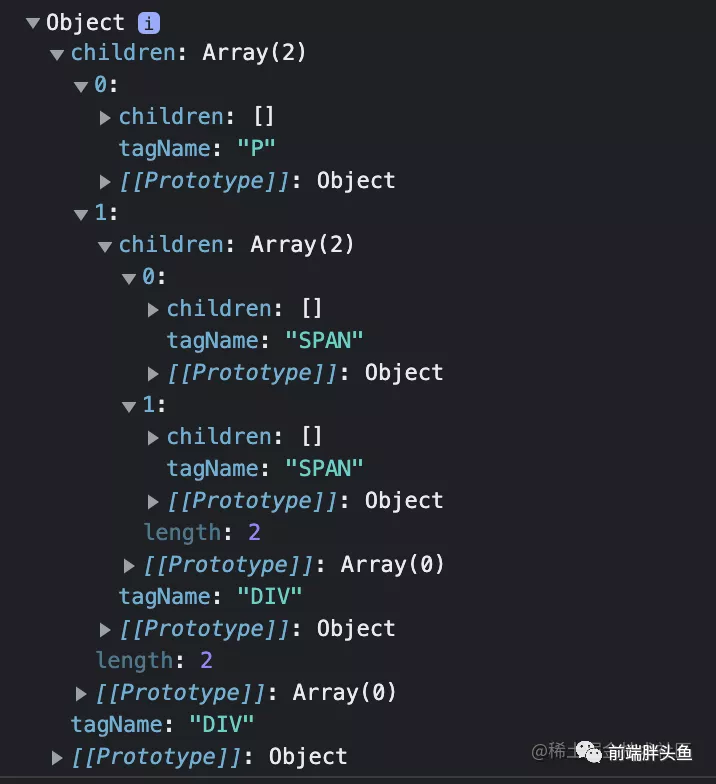
image.png
8. 列表转树形结构
相信大家工作中也遇到过类似的问题,前端需要的是树形结构的数据,但是后台返回的是一个list,我们需要将list转化为树形结构(当然这里你也可以把你的
后端同学干啪为啥不给我想要的数据)。
const arrayToTree = (array) => {
  const hashMap = {}
  let result = []

  array.forEach((it) => {
    const { id, pid } = it

    // 不存在时,先声明children树形
    // 这一步也有可能在下面出现
    if (!hashMap[id]) {
      hashMap[id] = {
        children: []
      }
    }

    hashMap[id] = {
      ...it,
      children: hashMap[id].children
    }
    // 处理当前的item
    const treeIt = hashMap[id]

    // 根节点,直接push
    if (pid === 0) {
      result.push(treeIt)
    } else {
      // 也有可能当前节点的父父节点还没有加入hashMap,所以需要单独处理一下
      if (!hashMap[pid]) {
        hashMap[pid] = {
          children: []
        }
      }
      // 非根节点的话,找到父节点,把自己塞到父节点的children中即可
      hashMap[pid].children.push(treeIt)
    }
  })

  return result
}

// 测试
const data = [
  // 注意这里,专门把pid为1的元素放一个在前面
  { id: 2, name: '部门2', pid: 1 },
  { id: 1, name: '部门1', pid: 0 },
  { id: 3, name: '部门3', pid: 1 },
  { id: 4, name: '部门4', pid: 3 },
  { id: 5, name: '部门5', pid: 4 },
  { id: 7, name: '部门7', pid: 6 },
]

console.log(JSON.stringify(arrayToTree(data), null, 2))
/*
[
  {
    "id": 1,
    "name": "部门1",
    "pid": 0,
    "children": [
      {
        "id": 2,
        "name": "部门2",
        "pid": 1,
        "children": []
      },
      {
        "id": 3,
        "name": "部门3",
        "pid": 1,
        "children": [
          {
            "id": 4,
            "name": "部门4",
            "pid": 3,
            "children": [
              {
                "id": 5,
                "name": "部门5",
                "pid": 4,
                "children": []
              }
            ]
          }
        ]
      }
    ]
  }
]
*/
9. 树形结构转列表
反过来也可以试试看
const tree2list = (tree) => {
  let list = []
  let queue = [...tree]

  while (queue.length) {
    // 从前面开始取出节点
    const node = queue.shift()
    const children = node.children
    // 取出当前节点的子节点,放到队列中,等待下一次循环
    if (children.length) {
      queue.push(...children)
    }
    // 删除多余的children树形
    delete node.children
    // 放入列表
    list.push(node)
  }

  return list
}

// 测试
const data = [
  {
    "id": 1,
    "name": "部门1",
    "pid": 0,
    "children": [
      {
        "id": 2,
        "name": "部门2",
        "pid": 1,
        "children": []
      },
      {
        "id": 3,
        "name": "部门3",
        "pid": 1,
        "children": [
          {
            "id": 4,
            "name": "部门4",
            "pid": 3,
            "children": [
              {
                "id": 5,
                "name": "部门5",
                "pid": 4,
                "children": []
              }
            ]
          }
        ]
      }
    ]
  }
]

console.log(tree2list(data))
/*
[
  { id: 1, name: '部门1', pid: 0 },
  { id: 2, name: '部门2', pid: 1 },
  { id: 3, name: '部门3', pid: 1 },
  { id: 4, name: '部门4', pid: 3 },
  { id: 5, name: '部门5', pid: 4 }
]
*/
10. sleep
实现一个函数,n秒后执行函数func
const sleep = (func, delay) => {
  return new Promise((resolve) => {
    setTimeout(() => {
      resolve(func())
    }, delay)
  })
}

const consoleStr = (str) => {
  return () => {
    console.log(str)
    return str
  }
}

const doFns = async () => {
  const name = await sleep(consoleStr('前端胖头鱼'), 1000)
  const sex = await sleep(consoleStr('boy'), 1000)
  const age = await sleep(consoleStr(100), 1000)

  console.log(name, sex, age)
}

doFns()
// 前端胖头鱼  1s later
// boy 2s later
// 100 3s later
// 前端胖头鱼 boy 100
11. 菲波那切数列
斐波那契数,通常用 F(n) 表示,形成的序列称为 斐波那契数列 。该数列由 0 和 1 开始,后面的每一项数字都是前面两项数字的和。也就是:

F(0) = 0,F(1) = 1
F(n) = F(n - 1) + F(n - 2),其中 n > 1
给你 n ,请计算 F(n) 。

示例 1:

输入:2
输出:1
解释:F(2) = F(1) + F(0) = 1 + 0 = 1
示例 2:

输入:3
输出:2
解释:F(3) = F(2) + F(1) = 1 + 1 = 2
示例 3:

输入:4
输出:3
解释:F(4) = F(3) + F(2) = 2 + 1 = 3
暴力实现
根据题目意思,很容易写出下面递归的暴力代码
const fib = (n) => {
  if (n === 0) {
    return 0
  }

  if (n === 1 || n === 2) {
    return 1
  }

  return fib(n -2) + fib(n - 1)
}

// 测试
console.log(fib(1)) // 1
console.log(fib(2)) // 1
// 试着统计一下计算时间
const t1 = Date.now()
console.log(fib(44)) // 701408733
console.log(Date.now() - t1) // 接近4393
缓存优化
上面的代码可以实现效果,但是性能堪忧,来看一个计算
fib(10)的过程
// 计算10
10 => 9 + 8 // 需要计算9和8
9 => 8 + 7 // 需要计算8和7
8 => 7 + 6 // 需要计算7和6
7 => 6 + 5 // 需要计算6和5
6 => 5 + 4 // 需要计算5和4
5 => 4 + 3 // 需要计算4和3
4 => 3 + 2 // 需要计算3和2
2 => 1 + 0 // 需要计算1和0
这个过程中如果按照上面暴力实现的代码会重复多次计算某些曾经计算过的值,比如8、7、6、5…等等,这个损耗是没有必要的,所以我们可以把计算的结果进行缓存,下次遇到求同样的值,直接返回即可
const fib = (n) => {
  // 缓存过直接返回
  if (typeof fib[ n ] !== 'undefined') {
    return fib[ n ]
  }

  if (n === 0) {
    return 0
  }

  if (n === 1 || n === 2) {
    return 1
  }

  const res = fib(n -2) + fib(n - 1)
  // 缓存计算的结果
  fib[ n ] = res

  return res
}

console.log(fib(1)) // 1
console.log(fib(2)) // 1

const t1 = Date.now()
console.log(fib(44)) // 701408733
console.log(Date.now() - t1) // 1ms
12. 实现一个函数sum函数
实现一个函数sum函数满足以下规律
sum(1, 2, 3).valueOf() // 6
sum(2, 3)(2).valueOf() // 7
sum(1)(2)(3)(4).valueOf() // 10
sum(2)(4, 1)(2).valueOf() // 9
分析
仔细观察这几种调用方式可以得到以下信息
- sum函数可以传递一个或者多个参数
- sum函数调用后返回的是一个新的函数且参数可传递一个或者多个
- 调用.valueOf时完成最后计算
看起来是不是有点函数柯里化的感觉,前面的函数调用仅仅是在缓存每次调用的参数,而valueOf的调用则是拿着这些参数进行一次求和运算并返回结果
const sum = (...args) => {
  // 声明add函数,其实主要是缓存参数的作用
  // 注意add调用完成还是会返回add函数本身,使其可以链式调用
  const add = (...args2) => {
    args = [ ...args, ...args2 ]
    return add
  }
  // 求和计算
  add.valueOf = () => args.reduce((ret, num) => ret + num, 0)

  return add
}

// 测试
console.log(sum(1, 2, 3).valueOf()) // 6
console.log(sum(2, 3)(2).valueOf()) // 7
console.log(sum(1)(2)(3)(4).valueOf()) // 10
console.log(sum(2)(4, 1)(2).valueOf()) // 9


