
引子:ES新特性已经是时代发展所必须掌握的知识,主流浏览器几乎全部支持,不支持还有Babel,怕啥?
此文涉及的知识倾向于面试总结,而非零基础学习,其中的ES6-ES12的叫法更准确的应该叫ES2015、ES2016….
1.let/const
let声明变量,const声明常量,且声明时必须初始化,后续常量可以修改(例如对象属性),不能重新赋值
推荐尽量使用const
共同特性:
- 块级作用域({}、for、while、do while、if、switch)
- 不允许同一作用域重复声明
- 不存在变量提升
- 暂时性死区
- 不会成为window上的属性和方法
2.模板字符串
使用反引号“,在其里面使用${expression}动态嵌入内容
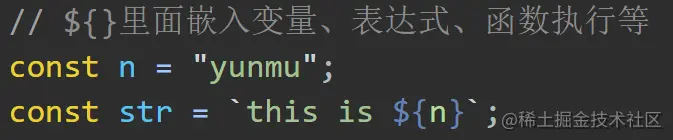
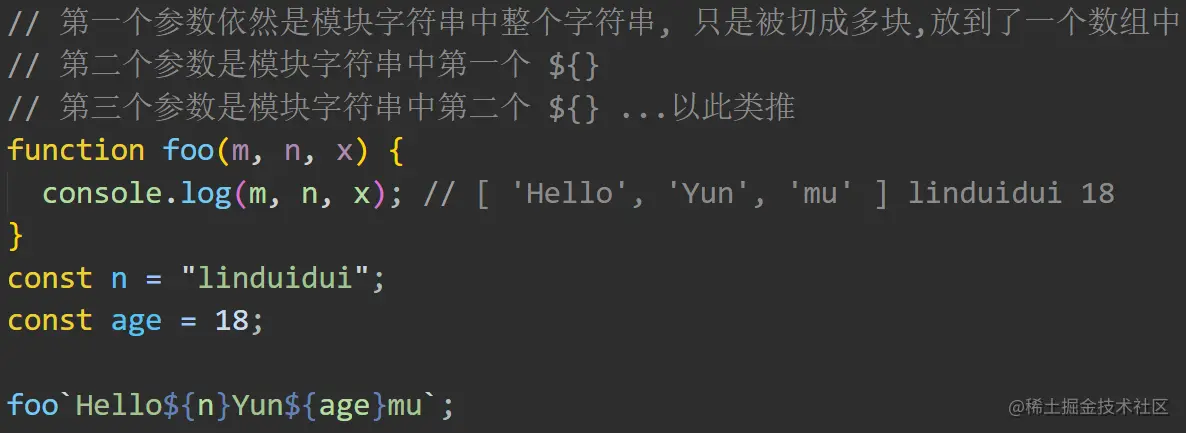
模板字符串标签函数:
3.字符串方法
- includes()
- startsWith()
- endsWith()
const message = 'Error: foo is not undefined.'
console.log(
message.startsWith('Error'),
message.endsWith('undefined.'),
message.includes('foo')
) // true true true
4.箭头函数
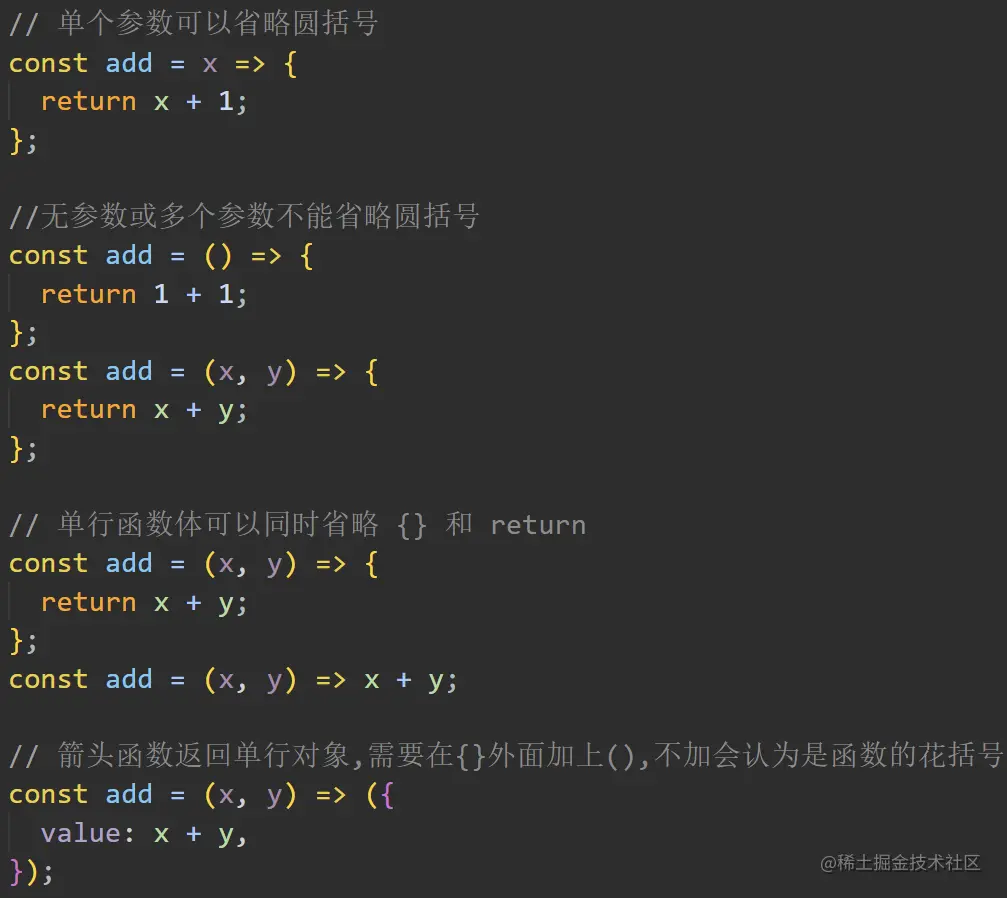
箭头函数格式:
const/let 函数名 = 参数 => 函数体
一般函数写成箭头函数:
function add() {} ===> const add = function () {} ==> const add = () => {}
箭头函数其内部this指向永远指向上层作用域的this,
箭头函数不适应场景:
- 作为构造函数
- 需要 this 指向调用对象的时候
- 需要arguments (可用剩余参数…替代解决)
5.解构赋值
数组:
// 数组解构 通过索引按顺序匹配解构
const [a, b, c] = [1, 2, 3];
console.log(a, b, c); // 1 2 3
// 数组本质是特殊的对象,因此可以对数组进行对象属性的解构
const arr = [1, 2, 3];
const { 0: first, [arr.length - 1]: last } = arr;
console.log(first, last); // 1 3
// 默认值
const [a, b, c = "defaultVal"] = [1, 2];
console.log(a, b, c); // 1 2 defaultVal
对象:
// 对象解构赋值 键名进行配对
const { n: name } = { n: "yunmu", age: 18 };
console.log(name); // yunmu
// 连续解构赋值 + 重命名 + 默认值
const {
name: handSome,
username = "linduidui",
friend: { n: n1 },
} = { name: "yunmu", age: 18, friend: { n: "baojiejie" } };
console.log(handSome, username, n1); // yunmu linduidui baojiejie
字符串:
// 既可以使用对象解构也可以使用数组解构
const [a, b, , , c] = "hello";
console.log(a, b, c); // h e o
const { 0: a, 1: b, length } = "hello";
console.log(a, b, length); // h e 5
其他类型数据例如数值布尔值会先转换为对应包装对象然后可以使用对象解构的方式解构出一些内置方法,例如toString:s
6.剩余参数
// 剩余参数与解构赋值结合,...解构只能用于最后一个位置
const [a, ...c] = [1, 2, 3];
console.log(c); // [ 2, 3]
// 剩余参数与解构赋值结合,...解构只能用于最后一个位置
const { x, y, ...z } = { a: 3, x: 1, y: 2, b: 4 };
console.log(x, y, z); // 1 2 { a: 3, b: 4 }
当没有剩余参数函数如果想接受传递的所有实参,可以使用 arguments
但是箭头函数没有 arguments ,剩余参数横空出世,只能在形参最后一位使用一次
const foo = (...args) => {
 console.log(args)
}
foo(1, 2, 3) // [ 1, 2, 3 ]
7.展开运算符
数组:
const arr = ["foo", "bar", "baz"];
console.log(...arr); // foo bar baz
console.log([...arr]); // 浅克隆 ['foo', 'bar', 'baz']
console.log({ ...arr }); // {0: 'foo', 1: 'bar', 2: 'baz'}
对象:
const yunmu = {
name: "云牧",
age: 18,
};
console.log({ ...yunmu }); // 对象展开必须放在 {} 中,浅克隆
const yunmu = {
name: "云牧",
age: 18,
};
const xiyan = {
name: "林怼怼",
age: 16,
school: "中心小学",
};
// 新对象拥有全部属性,相同属性,后者覆盖前者
console.log({ ...yunmu, ...xiyan }); // { name: "林怼怼", age: 16, school: "中心小学" }
注:如果展开不是对象,则自动转换为对象再罗列
字符串:
console.log({ ...'alex' }); // { '0': 'a', '1': 'l', '2': 'e', '3': 'x' }
console.log([...'alex']); // [ 'a', 'l', 'e', 'x' ]
console.log(...'alex'); // a l e x
8.函数默认值
不传参数,或者明确的传递 undefined 作为参数,只有这两种情况下,默认值才会生效,参数列表最好从右往左设置默认值
const multiply = (x, y = 1) => x * y;
console.log(multiply(2)); //  2
9.对象字面量增强
- 属性名和属性值相同时可以省略,只写属性名
- 对象方法可以直接写函数形式:method1(){}
- 使用方括号的方式计算动态属性名
const bar = 666;
const func = () => "age2";
const obj = {
// bar: bar,
bar, // 同上一行效果
// method1: function () {
// console.log(`method1: ${this}`)
// },
// 同上面的冒号属性函数写法
method2() {
console.log(`method2: ${this}`);
},
[func()]: 123, // 计算属性名
["s" + "ex"]: "male", // 计算属性名
};
console.log(obj); // {bar: 666, age2: 123, sex: 'male', method2: ƒ}
10.对象扩展方法
- Object.assign(target, source) 将多个源对象中的属性复制到一个目标对象中
- Object.keys()、Object.values() 和 Object.entries(),作为遍历一个对象的补充手段,供
for...of循环使用 - Object.is 相当于 === 的比较 但是判断 +0 不等于 -0, NAN 等于 NAN
- Object.getOwnPropertyDescriptors(obj) 获取对象的详细描述
// Object.assign
const target = {
a: 11,
b: 22,
};
const source1 = {
a: 123,
b: 456,
};
const source2 = {
a: 333,
c: 33,
};
// 合并到第一个对象返回
const result = Object.assign(target, source1, source2);
console.log(result); // { a: 333, b: 456, c: 33 }
console.log(result === target); // true
// Object.keys()、Object.values() 和 Object.entries()
const person = {
name: "云牧",
age: 18,
};
console.log(Object.keys(person)); //得到对象键组成的数组 ['name', 'age']
console.log(Object.values(person)); //得到对象值组成的数组 ['云牧', 18]
console.log(Object.entries(person)); //得到对象键值组成的二维数组 [['name', '云牧'], ['age', 18]]
// 解构遍历的键值对
for (const [key, value] of Object.entries(person)) {
console.log(key, value); // name yunmu age 18
}
// 数组有实例方法跟上面类似,只不过返回Iterator,但同样能用for...of遍历
console.log( [1, 2].keys());
console.log( [1, 2].values());
console.log( [1, 2].entries());
// Object.is
console.log(
0 === false, // false
0 == false, // true
+0 ===-0, // true
NaN === NaN, // false
Object.is(+0, -0), // false
Object.is(NaN, NaN) // true
)
const p1 = {
firstName: 'yun',
lastName: 'mu',
get fullName() {
return this.firstName + ' '+ this.lastName
}
}
const descriptors = Object.getOwnPropertyDescriptors(p1)
console.log(descriptors)
/*
{
firstName: { value: 'yun', writable: true, enumerable: true, configurable: true },
lastName: { value: 'mu', writable: true, enumerable: true, configurable: true },
fullName: {
get: [Function: get fullName],
set: undefined,
enumerable: true,
configurable: true
}
}
*/
const p3 = Object.defineProperties({}, descriptors)
p3.firstName = 'lin'
console.log(p3.fullName) // lin mu
11.for-of循环
- for-of 是新的遍历方法,规避了for-in循环缺陷,也可以正确响应 break、continue 和 return 语句(forEach 不同)
- for-of 循环不仅支持数组,字符串遍历,还支持大多数类数组对象,例如 DOM nodelist 对象,甚至Map、Set也可以
- 实现Iterable结构就是for…of的前提,因为对象没有Iterable,所以 for-of 循环不支持普通对象,但是通过我们对象扩展方法已经解决
const arr = ["yun", "mu", "dsb"];
// keys() 得到的是索引的可遍历对象,可以遍历出索引值
for (const key of arr.keys()) {
console.log(key); // 0 1 2
}
//values() 得到的是值的可遍历对象,可以遍历出值,这里不用values一样的效果
for (const item of arr) {
cconsole.log(item) // // item为每个实例,相当于数组的forEach
}
//搭配解构赋值
for (const [index, value] of arr.entries()) {
console.log(index, value); // 0 yun 1 mu 2 dsb
}
只要有 Symbol.iterator 方法,并且这个方法可以生成可遍历对象,就是原生可遍历的,就可以使用for-of循环遍历,例如:
- 数组
- 字符串
- Set
- Map
- arguments
- NodeList
使用了iterator接口的场景:
- 数组的展开运算符,能展开原生可遍历的
- 所有可遍历的都可以使用数组的解构赋值
- Set 和 Map 的构造函数参数,Map不仅要满足可以遍历的,还一般要是二维数组或者二维数组形成的Set、Map
迭代器的价值在于自定义暴露给外面统一遍历的接口,让外部不用关心内部的数据结构是如何:
// todos 实现可迭代接口 Iterable
const todos = {
life: ['吃饭', '睡觉', '打豆豆'],
learn: ['语文', '数学', '英语'],
work: ['喝茶'],
each: function (callback) {
const all = [].concat(this.life, this.learn, this.work)
for (const item of all) {
callback (item)
}
},
// 实现迭代器接口
[Symbol.iterator]: function () {
const all = [...this.life, ...this.learn, ...this.work]
let index = 0
// 必须返回迭代器对象
return {
// 必须要有next方法
next: function () {
// 迭代结果接口 IterationResult
return {
value: all[index],
done: index++ >= all.length
}
}
}
}
}
todos.each(function (item) {
console.log(item)
})
console.log('---------')
for(const item of todos) {
console.log(item)
}
// 吃饭
// 睡觉
// 打豆豆
// 语文
// 数学
// 英语
// 喝茶
// ---------
// 吃饭
// 睡觉
// 打豆豆
// 语文
// 数学
// 英语
// 喝茶
12.Set、Map
- Set是一系列无序、没有重复值的数据集合(类似没有重复成员的数组)
- 可以通过传入一个数组初始化一个 Set 实例或者通过 add 添加元素,重复元素会被忽略
// 例1
const set = new Set([1, 2, 3, 4, 4]);
console.log(set) // Set(4) {1, 2, 3, 4}
// 例2
const set = new Set();
[2, 3, 5, 4, 5, 8, 8].forEach(item => set.add(item));
for (let item of set) {
console.log(item);
}
// 2 3 5 4 8
Set 实例的属性和方法有:
size:获取元素数量add(value):添加元素,返回 Set 实例本身delete(value):删除元素,返回一个布尔值,表示删除是否成功has(value):返回一个布尔值,表示该值是否是 Set 实例的元素clear():清除所有元素,没有返回值
const s = new Set();
s.add(1).add(2).add(2); // 添加元素
s.size // 2
s.has(1) // true
ss.has(3) // false
s.delete(1);
s.has(2) // false
s.clear();
console.log(s);
Set 实例的遍历,可使用如下方法:
keys():返回键名的遍历器values():返回键值的遍历器。不过由于 Set 结构没有键名,只有键值(或者说键名和键值是同一个值),所以keys()和values()返回结果一致entries():返回键值对的遍历器forEach():使用回调函数遍历每个成员
let set = new Set(['aaa', 'bbb', 'ccc']);
for (let item of set.keys()) {
console.log(item);
}
// aaa
// bbb
// ccc
for (let item of set.values()) {
console.log(item);
}
// aaa
// bbb
// ccc
for (let item of set.entries()) {
console.log(item);
}
// ["aaa", "aaa"]
// ["bbb", "bbb"]
// ["ccc", "ccc"]
set.forEach((value, key) => console.log(key + ' : ' + value))
// aaa : aaa
// bbb : bbb
// ccc : ccc
Map 和 对象 都是键值对的集合,但是对象一般用字符串或者 Symbol 当作键名,但是 Map 任意基本都能当键名:
const map = new Map();
const obj = {p: 'Hello World'};
map.set(obj, 'OK')
map.get(obj) // "OK"
map.has(obj) // true
map.delete(obj) // true
map.has(obj) // false
Map 实例的属性和方法如下:
size:获取成员的数量set:设置成员 key 和 valueget:获取成员属性值has:判断成员是否存在delete:删除成员clear:清空所有
const map = new Map();
map.set('aaa', 100);
map.set('bbb', 200);
map.size // 2
map.get('aaa') // 100
map.has('aaa') // true
map.delete('aaa')
map.has('aaa') // false
map.clear()
Map 实例的遍历方法有:
keys():返回键名的遍历器values():返回键值的遍历器entries():返回所有成员的遍历器forEach():遍历 Map 的所有成员
const map = new Map();
map.set('aaa', 100);
map.set('bbb', 200);
for (let key of map.keys()) {
console.log(key);
}
// "aaa"
// "bbb"
for (let value of map.values()) {
console.log(value);
}
// 100
// 200
for (let item of map.entries()) {
console.log(item[0], item[1]);
}
// aaa 100
// bbb 200
// 或者
for (let [key, value] of map.entries()) {
console.log(key, value);
}
// aaa 100
// bbb 200
Set/Map构造函数的参数:
- Set:数组、字符串、arguments、NodeList、Set 等
- Map:数组(二维数组)、Set(参数传入二维数组的Set)、Map 等
除此之外还有 WeakSet、WeakMap,
- WeakSet 的成员只能是对象且都是弱引用
- WeakMap只接受对象作为键名(null除外)且也是弱引用
13.Symbol
主要作用就是为对象添加独一无二的属性名:
// 创建Symbol
const s = Symbol()
console.log(s) // Symbol()
console.log(typeof s) // symbol
// 独一无二
console.log(Symbol() === Symbol()) // false
// 后面字符串为 Symbol 实例添加描述,主要方便区分,用处不大
console.log(Symbol('foo')) // Symbol(foo)
console.log(Symbol('bar')) // Symbol(bar)
console.log(Symbol('baz')) // Symbol(baz)
// Symbol当对象的键名
const obj = {}
obj[Symbol()] = 123
obj[Symbol()] = 456
console.log(obj) // { [Symbol()]: 123, [Symbol()]: 456 }
// // 作为私有成员防止被访问
const name = Symbol()
const person = {
[name]: 'yunmu',
say(){
console.log(this[name])
}
}
person.say()// yunmu
console.log(person[Symbol()])
// Symbol.for 新建对象,如果之前使用字符串创建过则复用之前的
const s1 = Symbol.for('foo')
const s2 = Symbol.for('foo')
console.log(
s1 === s2, // true
// Symbol.for的参数会被转化为字符串
Symbol.for(true) === Symbol.for('true'), // true
)
const obj2 = {
// 为对象实现迭代器时会用到
[Symbol.toStringTag]: 'XObject'
}
console.log(obj2.toString()) // [object Object] [object XObject]
// 遍历
const obj3 = {
[Symbol()]: 'symbol value',
foo: 'normal value'
}
// 只能遍历普通属性
for(const key in obj3) {
console.log(key) // foo
}
console.log(Object.getOwnPropertySymbols(obj3)) // [ Symbol() ]
//只能遍历Symbol属性名
for(let key of Object.getOwnPropertySymbols(person)){
console.log(key);
}
//既能取到普通属性又有Symbol属性
for(let key of Reflect.ownKeys(person)){
console.log(key);
}
console.log(Object.keys(obj3)) // [ 'foo' ]
console.log(JSON.stringify(obj3)) // {"foo": "normal value"}
14.Proxy
- ES5中有一个 Object.defineProperty ,Vue2 就是通过这个实现数据双向绑定
- ES6提供了 Proxy,可以监视对象的读写过程,Vue3.0 通过 Proxy 实现数据绑定
// Proxy
const person = {
name: 'yunmu',
age: 18
}
const personProxy = new Proxy(person, {
// 参数为目标对象、属性名
get (target, property) {
console.log(target, property) // { name: 'yunmu', age: 18 } name
return property in target ? target[property]: 'default'
},
// 参数为目标对象、属性名、属性值
set (target, property, value) {
console.log(target, property, value) // { name: 'yunmu', age: 18 } gender true
if(property === 'age') {
// 判断给定的参数是否为整数
if(!Number.isInteger(value)) {
throw new TypeError(`${value} is not an int`)
}
}
}
})
personProxy.gender = true
// personProxy.age = '11' // TypeError: 11 is not an int
personProxy.age = 11
console.log(personProxy.name) // yunmu
console.log(personProxy.xxx) // default
Proxy对比Object.defineProperty:
- Object.defineProperty 只能监听属性的读写
- Proxy 能监视更多对象操作:delete
const person = {
 name: 'yunmu',
 age: 18
}
const personProxy = new Proxy(person, {
 deleteProperty(target, property) {
  console.log('delete', property) // delete age
  delete target[property]
  }
})
delete personProxy.age
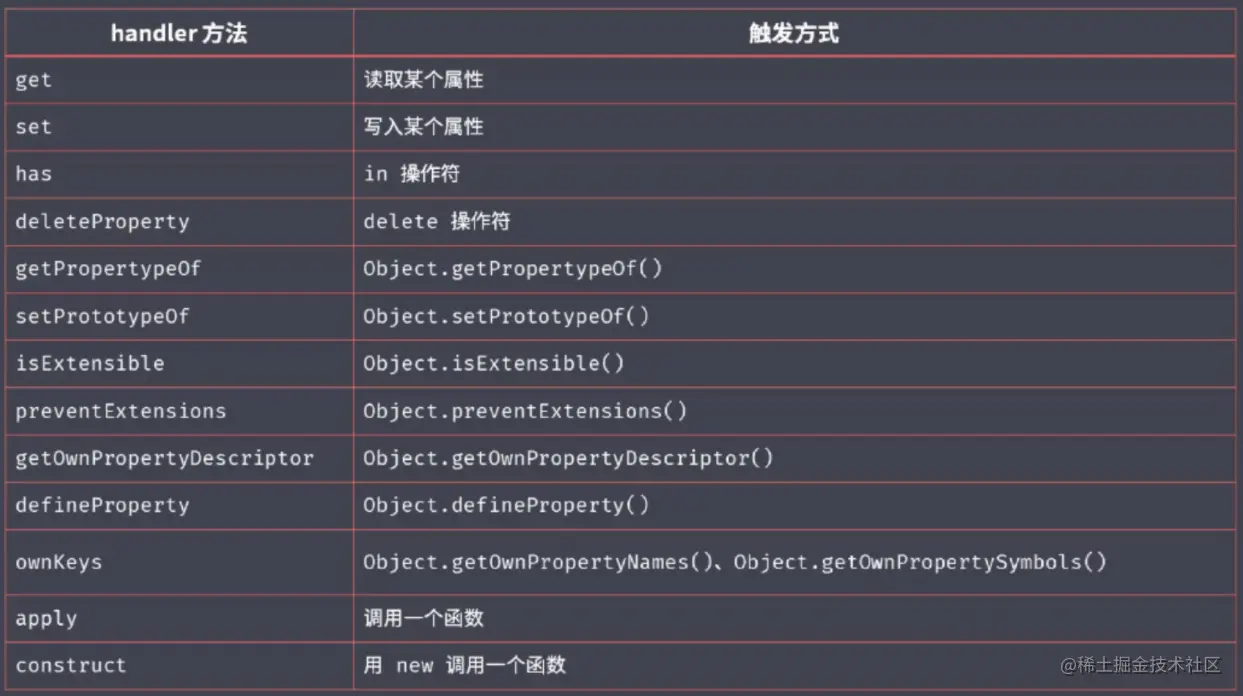
- Proxy 原生监听数据变化(vue 重写数组的操作方法,劫持方法调用过程)
const list = []
const listProxy = new Proxy(list, {
 set(target, property, value) {
  console.log('set', property, value)
  target[property] = value
  return true // 表示设置成功
  }
})
listProxy.push(100)
// set 0 100
// set length 1
15.Reflect
Reflect属于静态类(如 Math ),不能 new,只能调用静态方法:Reflect.get()
Reflect 内部封装了一系列对对象的底层操作,Reflect 成员方法就是 Proxy 处理对象的默认实现
const proxy = new Proxy(obj, {
 get(target, property) {
  // 不写get逻辑,相当于调用Reflect.get(target, property)。
  return Reflect.get(target, property)
  }
})
Reflect统一提供一套用于操作对象的API:
const obj = {
foo: '111',
bar: 'rrr',
age: 18
}
// console.log("age" in obj)
// console.log(delete obj['bar'])
// console.log(Object.keys(obj))
console.log(Reflect.has(obj, 'name')) // false
console.log(Reflect.deleteProperty(obj, 'bar')) // true
console.log(Reflect.ownKeys(obj)) // [ 'foo', 'age' ]
16.Promise
- 更优雅异步编程解决方案
Promise可以将回调变成链式调用写法- 解决了传统异步编程中回调地狱的问题
三个状态:pending、fulfilled、rejected
两个过程:
- pending→fulfilled(resolve)
- pending→rejected(reject)
三个方法:then、catch、finally
Promise静态方法:
- Promise.all():所有状态都变成 resolved,最终的状态才会变成 resolved、只要有一个变成 rejected,最终的状态就变成 rejected
- Promise.any():只要其中的一个 promise 成功,就返回那个已经成功的 promise、所有的 promises 都失败/拒绝),就返回一个失败的 promise
- Promise.race():取决于第一个完成的 Promise 实例对象,如果第一个完成的成功了,那最终的就成功,否则就失败
- Promise.allSettled():忠实的记录下各个 Promise 的状态表现
17.Async 、 Await
- Generator 的 yield 的语法糖,解决了回调地狱的问题
18.数组字符串的方法及指数运算符
Array.from():将伪数组或可遍历对象转换为真数组
<button>按钮1</button>
<button>按钮2</button>
<button>按钮3</button>
console.log(Array.isArray(document.getElementsByTagName('button')));
Array.prototype.includes():判断一个数组是否包含一个指定的值,包含true,否则返回 false
const arr = ['foo', 1, false, NaN]
// 以前使用indexOf, 存在则返回下标,不存在则返回-1, 缺点是无法判断NaN
console.log(arr.indexOf('foo')) // 0
console.log(arr.indexOf(1)) // 1
console.log(arr.indexOf(false)) // 2
console.log(arr.indexOf(NaN)) // -1
console.log(arr.includes('foo')) // true
console.log(arr.includes(1)) // true
console.log(arr.includes(false)) // true
console.log(arr.includes(NaN)) // true
Array.prototype.fill:一个固定值填充一个数组中从起始索引到终止索引内的全部元素,不包括终止索引
const arr = [1, 2, 3, 4];
// 三个参数: 填充数组元素的值,起始索引(默认0),终止索引(默认this.length)
console.log(arr.fill(0, 2, 4)) // [1, 2, 0, 0]
console.log(arr.fill(5, 1)); // [1, 5, 5, 5]
console.log(arr.fill(6)); // [6, 6, 6, 6]
后面的forEach、map 、filter、some、every、find、findIndex的参数都一样,举个例子:
// callback的三个参数:遍历项 索引 数组本身,thisArg则可以指定callback里的this变量
arr.filter(callback(element[, index[, array]])[, thisArg])
Array.prototype.forEach:新加的数组遍历方法
const arr = [1, 2, 3, 4, 5]
arr.forEach((item, index, arr) => {
console.log(item, index, arr)
})
/*
1 0 [ 1, 2, 3, 4, 5 ]
2 1 [ 1, 2, 3, 4, 5 ]
3 2 [ 1, 2, 3, 4, 5 ]
4 3 [ 1, 2, 3, 4, 5 ]
5 4 [ 1, 2, 3, 4, 5 ]
*/
// 绑定个 this 瞧瞧, 注意如果回调函数是箭头函数则绑定失败
const out = [];
[1, 2, 3].forEach(function(elem) {
// this是out哦
this.push(elem * elem);
}, out);
Array.prototype.map():其结果是数组中每个元素调用一次提供的 callback 函数后的返回值
const mapArr = [1, 2, 3, 4, 5]
// 对每一个元素数值进行翻倍
const newArr = mapArr.map((num, index, arr) => 2 * num)
console.log(newArr) // [ 2, 4, 6, 8, 10 ]
Array.prototype.filter():过滤数组的元素
const filterArr = [1, 2, 3, 4, 5]
// 返回大于3的集合
const newArr = filterArr.filter((num, index, arr) => num > 3)
console.log(newArr) // [ 4, 5 ]
Array.prototype.some():遍历数组元素,一个返回 true,整体就返回 true,否则就 false
const someArr = [false, true, false, true, false]
const someArr2 = someArr.some((item, index, arr) => item)
console.log(someArr2) // true
Array.prototype.every(): 遍历数组元素,所有返回 true , 整体才返回 true,不然就 false
const everyArr = [false, true, false, true, false]
// 三个参数:遍历项 索引 数组本身
const newArr = everyArr.every((item, index, arr) => item)
console.log(newArr) // false
Array.prototype.find():返回数组中满足提供的测试函数的第一个元素的值。否则返回 undefined
let arr = [2, 3, 2, 5, 7, 6];
let result = arr.find((item, index, arr) => {
return item > 4; //遍历数组arr,一旦发现有第一个元素大于4,就把这个元素返回
});
console.log(result); // 5
Array.prototype.findIndex():返回数组中满足提供的测试函数的第一个元素的索引,若没有找到对应元素则返回 -1
let arr = [2, 3, 2, 5, 7, 6];
let result = arr.findIndex((item, index, arr) => {
return item > 4; // 遍历数组arr,一旦发现有第一个元素大于4,就把这个元素的index返回
});
console.log(result); // 3
Array.prototype.reduce():对数组中的每个元素执行一个自己提供的 reducer 函数,将结果汇总成一个值
// arr.reduce(callback(accumulator, currentValue[, index[, array]])[, initialValue])
// accumulator 上一次调用回调时返回的累积值,
// currentValue 数组中正在处理的元素
// index可选 正在处理的当前元素的索引
// array可选 调用reduce()的数组
// initialValue可选 第一次调用 callback函数时的第一个参数的值,没有提供则使用数组第一个元素
const arr = [1, 2, 3, 4];
const initialValue = 0;
const sumWithInitial = arr.reduce(
// 0 + 1 + 2 + 3 + 4
(previousValue, currentValue) => previousValue + currentValue,
initialValue
);
console.log(sumWithInitial); // 10
- 数组的 flat 方法扁平化多维数组
- flatMap方法 先 map 映射完每个元素再 flat(1)
const arr = [1, 2, [3, 4, [3.1, 3.2]], 5]
console.log(arr.flat(1)) // [1, 2, 3, 4, Array(2), 5]
console.log(arr.flat(Infinity)) // [1, 2, 3, 4, 3.1, 3.2, 5]
- padEnd/padStart 用指定字符串填充目标字符串的头部或者尾部,达到指定长度位置
let str = "a";
console.log(str.padStart(5,"cd")); // cdcda
console.log(str.padEnd(5,"cd")); // acdcd
- trimStart trimEnd
const message = "  Hello Yun  "
console.log(message.trim()) // "Hello Yun"
console.log(message.trimStart()) // "Hello Yun  "
console.log(message.trimEnd()) // "Hello Yun"
- 指数运算符
console.log(2 ** 5) // 32
19.Class
基本写法:
- class 是一种新的语法形式,是
class Name {...}这种形式,和函数的写法完全不一样 - 两者对比,构造函数函数体的内容要放在 class 中的
constructor函数中,constructor即构造器,初始化实例时默认执行 - class 中函数的写法是
add() {...}这种形式,并没有function关键字
class Person {
constructor(name) {
this.name = name
}
say () {
console.log(`hi, my name is ${this.name}`)
}
}
const p = new Person('yunmu')
p.say()
// 可以改造为ES5构造函数的形式
// function Person(name) {
// this.name = name
// }
// Person.prototype.say = function() {
// console.log(`hi, my name is ${this.name}`)
// }
// const p = new Person('yunmu')
// p.say() // hi, my name is jal
静态方法, this 指向当前类型,而不是实例:
class Person {
constructor(name) {
this.name = name
}
say () {
console.log(`hi, my name is ${this.name}`)
}
static create(name) {
// this 指向当前类型,而不是实例
console.log(this) // [Function: Person]
return new Person(name)
}
}
const tom = Person.create('tom')
tom.say() // hi, my name is tom
继承使用 extends 关键词,子类的constructor一定要执行super(),以调用父类的constructor
class Student extends Person {
constructor(name, number){
super(name)
this.number = number
}
hello () {
// super 代表父类的原型对象 Person.prototype
// 通过 super 调用父类的方法时,方法内部的 this 指向当前的子类实例
super.say()
console.log(`my school number is ${this.number}`)
}
}
const s = new Student('jack', 100)
s.hello()
// hi, my name is jack
// my school number is 100
20.ES Modules
如果只是输出一个唯一的对象,使用export default即可,代码如下:
// 创建 util1.js 文件,内容如
export default {
a: 100
}
// 创建 index.js 文件,内容如
import obj from './util1.js'
console.log(obj)
如果想要输出许多个对象,就不能用default了,且import时候要加{...},代码如下:
// 创建 util2.js 文件,内容如
export function fn1() {
alert('fn1')
}
export function fn2() {
alert('fn2')
}
// 创建 index.js 文件,内容如
import { fn1, fn2 } from './util2.js'
fn1()
fn2()
21.生成器函数 generator
避免异步编程中回调函数嵌套过深,提供更好的异步编程解决方案
function * foo () {
console.log('yun')
return 100
}
// 这个foo就是一个Generator函数
const result = foo()
console.log(result) // Object [Generator] {}
console.log(result.next())
// yun
// { value: 100, done: true }
// 可以看出生成器对象实现了Iterator接口
配合yield关键词使用:
生成器函数会返回一个生成器对象,调用这个生成器对象的 next 方法,才会让函数体执行
一旦遇到了 yield 关键词,函数的执行则会暂停下来,next 函数的参数作为 yield 结果返回
如果继续调用函数的 next 函数,则会再上一次暂停的位置继续执行,直到函数体执行完毕,next 返回的对象的 done 就变成了 true
function * fn () {
console.log(111)
yield 100
console.log(222)
yield 200
console.log(333)
yield 300
}
const generator = fn()
console.log(generator.next())
// 111
// { value: 100, done: false }
console.log(generator.next())
// 222
// { value: 200, done: false }
console.log(generator.next())
// 333
// { value: 300, done: false }
案例1:发号器:
function * createIdMaker () {
let id = 1
while(true) {
yield id++
}
}
const idMaker = createIdMaker()
console.log(idMaker.next())
console.log(idMaker.next())
console.log(idMaker.next())
console.log(idMaker.next())
console.log(idMaker.next())
// { value: 1, done: false }
// { value: 2, done: false }
// { value: 3, done: false }
// { value: 4, done: false }
// { value: 5, done: false }
案例2:Generator函数实现迭代器Iterator:
const todos = {
life: ['吃饭', '睡觉', '打豆豆'],
learn: ['语文', '数学', '英语'],
work: ['喝茶'],
// 实现迭代器接口
[Symbol.iterator]: function * () {
const all = [...this.life, ...this.learn, ...this.work]
for (const item of all) {
yield item
}
}
}
for(const item of todos) {
console.log(item)
}
// 吃饭
// 睡觉
// 打豆豆
// 语文
// 数学
// 英语
// 喝茶
Generator实现异步:
// 注意:generator.next(value)中,next传入的参数会作为上一次yield的返回值
function ajax(url) {
return new Promise(function(resolve, reject) {
var xhr = new XMLHttpRequest()
xhr.open("GET", url)
xhr.responseType = 'json'
xhr.onload = function () {
if(this.status === 200)
resolve(this.response)
else {
reject(new Error(this.statusText))
}
}
xhr.send()
})
}
// 生成器函数
function * main () {
const users = yield ajax('/api/users.json')
console.log(users)
const posts = yield ajax('/api/posts.json')
console.log(posts)
const urls = yield ajax('/api/urls.json')
console.log(urls)
}
// 调用生成器函数得到一个生成器对象
const generator = main()
// 递归实现generator.next()的调用,直到done为true终止
function dfs(value) {
const result = generator.next(value)
if(result.done) return
result.value.then(data=>{
console.log(data)
dfs(data)
})
}
dfs()
// 打印结果
// Generator实现异步.js:35 {username: "yibo"}
// Generator实现异步.js:19 {username: "yibo"}
// Generator实现异步.js:35 {posts: "jiailing"}
// Generator实现异步.js:22 {posts: "jiailing"}
// Generator实现异步.js:35 {posts: "/api/posts.json", users: "/api/users.json"}
// Generator实现异步.js:25 {posts: "/api/posts.json", users: "/api/users.json"}
封装生成器函数执行器co:
function ajax(url) {
return new Promise(function (resolve, reject) {
var xhr = new XMLHttpRequest();
xhr.open("GET", url);
xhr.responseType = "json";
xhr.onload = function () {
if (this.status === 200) resolve(this.response);
else {
reject(new Error(this.statusText));
}
};
xhr.send();
});
}
// 生成器函数
function* main() {
try {
const users = yield ajax("/api/users.json");
console.log(users);
const posts = yield ajax("/api/posts.json");
console.log(posts);
const urls = yield ajax("/api/urls.json");
console.log(urls);
} catch (e) {
// 如果生成器函数中,发生了异常,会被生成器对象的throw方法捕获
console.log(e);
}
}
// 封装了一个生成器函数执行器
function co(main) {
// 调用生成器函数得到一个生成器对象
const generator = main();
// 递归实现generator.next()的调用,直到done为true终止
function handleResult(result) {
if (result.done) return;
result.value.then(
(data) => {
handleResult(generator.next(data));
},
(error) => {
generator.throw(error);
}
);
}
handleResult(generator.next());
}
co(main);
// Generator实现异步.js:42 {username: "yunmu"}
// Generator实现异步.js:20 {username: "yunmu"}
// Generator实现异步.js:42 {posts: "linduidui"}
// Generator实现异步.js:23 {posts: "linduidui"}
// Generator实现异步.js:42 {posts: "/api/posts.json", users: "/api/users.json"}
// Generator实现异步.js:26 {posts: "/api/posts.json", users: "/api/users.json"}
22.BigInt
- 新的基础数据类型,表示大的整数(早期JS不能正确表示过大的数字)
const bigInt = 1929191292091n
23.空值合并和可选链
空值合并操作符(??)是一个逻辑操作符,当左侧的操作数为 null 或者 undefined 时,返回其右侧操作数,否则返回左侧操作数
const foo = "";
const result1 = foo || "默认值";
const result2 = foo ?? "默认值";
console.log(result1); // 默认值
console.log(result2); // ""
可选链作符( ?. )允许读取位于连接对象链深处的属性的值,在遇到取值为空的情况下返回 undefined
const obj = {
friend: {
boyFriend: {
name: "yunmu",
},
},
};
if (obj.friend && obj.friend.boyFriend) {
console.log(obj.friend.boyFriend.name);
}
// 可选链
console.log(obj.friend?.boyFriend?.name);
24.Global This
有时需要获取 JS 环境下全局对象值,但是不同环境不同,浏览器环境相当于window,Node环境下 global Object
后面对全局对象进行了统一的规范:globalThis
console.log(globalThis)


